

Branching and CI
This page helps you make By Dawn’s branches fit your repos: named the way your team names branches, started from the right place, and built by your CI.
When By Dawn works on a ticket, it does the work on a branch of its own, one per repo, and opens the pull request from it. A branching policy decides three things about that branch:
- its name, e.g.
feature/SAW-1288-login-loop - the branch it starts from, e.g.
develop - the branch its pull request opens into, e.g.
develop
Out of the box, every ticket gets saw/<ticket id>, cut from the repo’s default branch and opened
back into it. That works until your CI only builds your own branch patterns (feature/*,
bugfix/*, hotfix/*), or you work in GitFlow from develop. Then you have two choices: pick a
strategy below that matches how you work, or keep saw/ branches and teach your CI about them
(the no-code workaround).
The four strategies
Section titled “The four strategies”Set the policy in Settings, then Organization, then Branching for the whole organization, or in Settings, then This project, then Branching for one project. Pick a strategy card first. It fills in the pattern and the branch types below it, and the Strategy in force line at the top names the one that applies.
| Strategy | Pattern | Starts from → opens into |
|---|---|---|
| SAW default | saw/{id} |
default branch → default branch |
| Trunk-based | {type}/{id}-{slug} |
default branch → default branch, for every type |
| GitFlow | {type}/{id}-{slug} |
feature and bugfix: development branch → development branch. hotfix: default branch → default branch |
| Custom | your own | your own, per branch type |
For a ticket SAW-1288 “Login loops after password reset” labelled bug, in a repo whose default
branch is main and development branch is develop:
| Strategy | Branch | From | PR into |
|---|---|---|---|
| By Dawn default | saw/SAW-1288 |
main |
main |
| Trunk-based | bugfix/SAW-1288-login-loops-after-password-reset |
main |
main |
| GitFlow | bugfix/SAW-1288-login-loops-after-password-reset |
develop |
develop |
GitFlow, labelled hotfix |
hotfix/SAW-1288-login-loops-after-password-reset |
main |
main |
Change any field of a preset and the card becomes Custom (based on GitFlow), so it’s always clear that the policy no longer matches the preset.
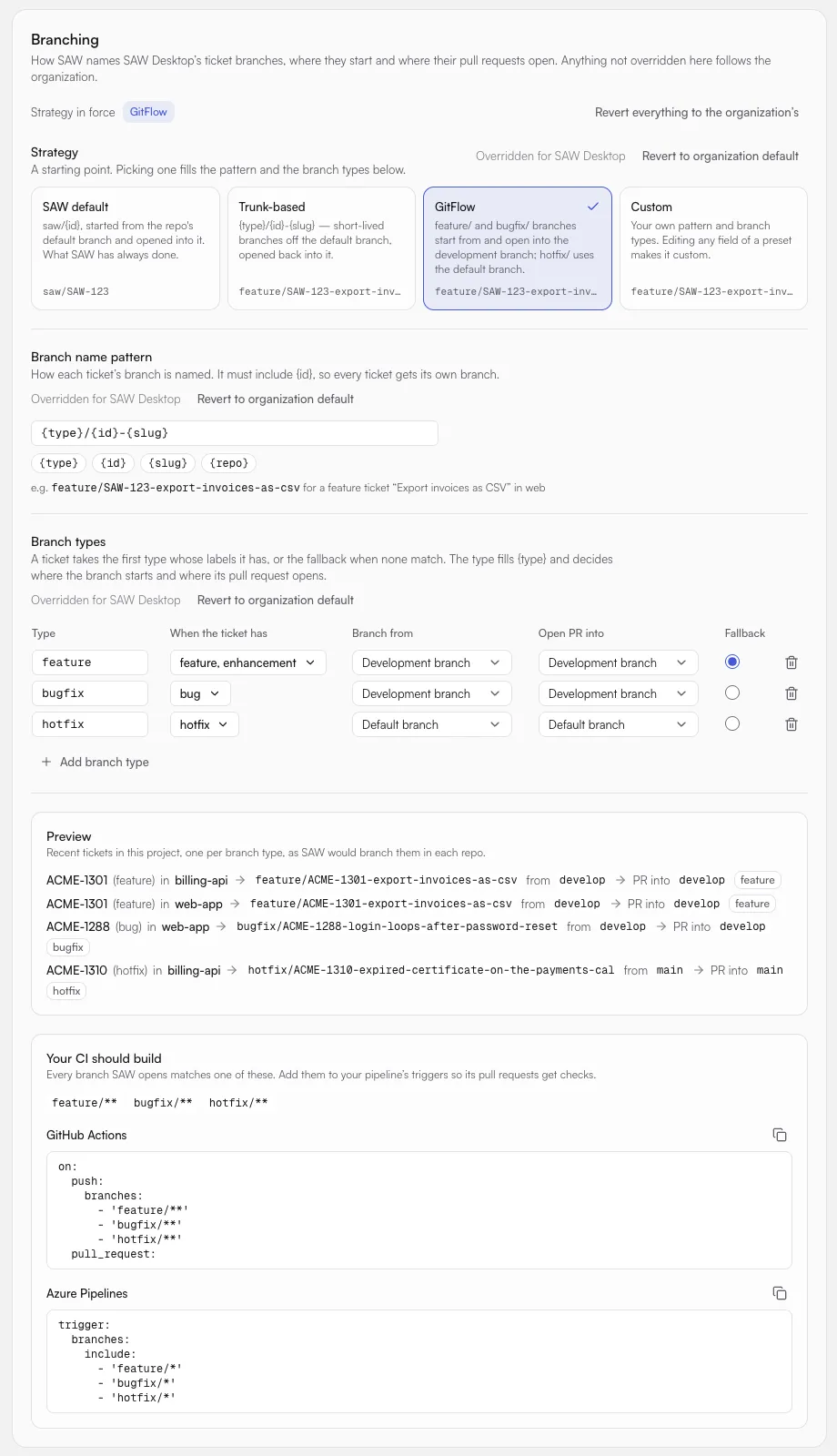
The Preview renders the policy you’re editing against recent tickets in the project, one per branch
type, in each of its repos. The server produces it with the same code that names a worker’s branch, so
what the preview shows is what a worker gets. If a base or target branch doesn’t exist on a repo’s
remote, the preview warns you (for example, “develop not found in web-app”). That’s a warning, not an
error, because the policy may be set up before the branch exists.
The branch name pattern
Section titled “The branch name pattern”Build the pattern from text and these tokens:
| Token | Becomes |
|---|---|
{id} |
The ticket id, e.g. SAW-1288. Required, exactly once, so every ticket gets its own branch. |
{type} |
The ticket’s branch type, e.g. bugfix (see below). |
{slug} |
The title in lowercase-with-dashes, cut to 40 characters. A title with no letters or digits drops the slug and the separator next to it: feature/SAW-7, not feature/SAW-7-. |
{repo} |
The repo’s name. |
By Dawn refuses a pattern next to the field, in plain words, when:
{id}is missing or appears more than once- the result isn’t a valid git branch name (
.., spaces, a trailing.lock, …) - the name would be longer than 200 characters, including the
-migrationssuffix By Dawn adds when it splits database migrations into their own pull request - a branch would be named the same as the branch it starts from or opens into
- there’s no branch type, or the fallback type isn’t one of them
How labels pick a branch type
Section titled “How labels pick a branch type”Tickets don’t have a type field, so By Dawn picks a branch type from the ticket’s labels. Each row in Branch types lists the labels that select it (When the ticket has). For each ticket:
- A type picked on the ticket itself wins (see Before work starts).
- Otherwise By Dawn takes the first type, top to bottom, that has one of the ticket’s labels. Matching ignores case.
- A ticket that matches no type gets the fallback type (the radio button in the Fallback
column). In the presets, that’s
feature.
The GitFlow preset maps feature and enhancement to feature, bug to bugfix and hotfix to
hotfix. Trunk-based adds chore. Rename them, add types (up to 20) or change their labels to match the
labels your organization uses.
Each type also sets Branch from and Open PR into: the repo’s Default branch, its Development
branch, or a branch you name (e.g. release/2026.10).
Development branch per repo
Section titled “Development branch per repo”GitFlow needs to know which branch is each repo’s develop. Set it on the Repos page, next to the
repo’s default branch. Both fields save when you press Enter or leave the field.
A repo with no development branch uses its default branch wherever a type says Development branch.
So one GitFlow policy also covers repos that don’t have a develop: their feature branches start from and
open into main.
Over the API, the same two fields are on the repo:
PATCH https://workspace.dev.sawrun.com/api/v1/orgs/{orgId}/projects/{projectId}/repos/{repoId}Authorization: Bearer eyJ…Content-Type: application/json
{ "defaultBranch": "main", "developmentBranch": "develop" }
Organization, project and repo
Section titled “Organization, project and repo”The policy is set at three levels, and each field inherits on its own:
- Settings, then Organization, then Branching sets the organization’s default.
- Settings, then This project, then Branching overrides it for one project.
- A repo’s Branching for dialog, opened from its row on the Repos page, overrides it for that repo (“Anything not set here follows the project.”). Use this when one project mixes trunk-based and GitFlow repos.
Each part of the policy says where its value comes from, such as Overridden for the project. Revert to organization default goes back to inheriting, and Revert everything to the organization’s does that for the whole policy at once. Because fields inherit separately, a project can change only the pattern and keep the organization’s branch types.
Nothing set anywhere means SAW default, which is what every organization had before branching policies existed.
Set once, never renamed
Section titled “Set once, never renamed”By Dawn names a ticket’s branch in a repo when work first starts there (the first bind), and stores it. After that the branch is locked: changing the policy, the ticket’s labels or its title never renames a branch that already exists. The ticket’s Branch line shows it with a lock and the reason, “Set when the worker started — changing settings won’t rename it.”
A repo whose work started before branching policies existed keeps its saw/ branch.
Before work starts: pick the type and target
Section titled “Before work starts: pick the type and target”Until a worker first starts on a ticket, its Branch line in the ticket panel shows the branch the ticket would get, and you can change:
- the Type: Auto, which picks from the labels and says what it picked (for example “Auto — bugfix (from a label)”), or one of the policy’s types
- each repo’s target, the branch its PR opens into: the repo’s default or development branch.
Reset to the type’s target goes back to what the type says. The branch then also starts from that target,
so work aimed at
developis cut fromdevelop.
When the pull request is done
Section titled “When the pull request is done”Once a ticket’s pull request merges, By Dawn deletes the ticket’s branch. Closed pull requests keep their branch unless you turn that on too. Both switches, Delete branches of merged pull requests and Delete branches of closed pull requests, are on the Branch cleanup card in Settings, then Organization, then Pull requests, and a project can set its own answer for either one in Settings, then This project, then Pull requests.
By Dawn only ever deletes the branch it made for that ticket, and keeps it if:
- someone pushed to it after the pull request ended,
- another open pull request still uses it,
- it’s protected, or it’s the repo’s default branch.
A closed pull request’s branch is left alone while the ticket is still being worked, because the worker may push it again for its next pull request. Deleting it waits until the ticket is done or archived.
If your repo already has GitHub’s Automatically delete head branches on, nothing changes: By Dawn finds the branch already gone. Branches from pull requests that ended before this setting existed are kept.
Set up your CI
Section titled “Set up your CI”By Dawn pushes the branch, then opens the pull request from it, so your pipeline has two chances to build it: on push of the branch, and on the pull request. Your CI should build, at the foot of Settings, then This project, then Branching, lists the patterns your policy produces, with ready-to-copy snippets. For the GitFlow preset:
feature/**, bugfix/**, hotfix/**
GitHub Actions
Section titled “GitHub Actions”on.push.branches filters on the pushed branch, so add By Dawn’s patterns there:
on: push: branches: - 'feature/**' - 'bugfix/**' - 'hotfix/**' pull_request:pull_request filters branches on the pull request’s base branch, not the head. A filter like the
one below already builds every By Dawn pull request into develop or main, whatever its branch is called:
on: pull_request: branches: [develop, main]If a required status check gates merging, it runs on those pull requests too.
Azure Pipelines
Section titled “Azure Pipelines”The YAML trigger decides which pushed branches build. In Azure Pipelines * already spans /, so
feature/* covers feature/SAW-1288-…:
trigger: branches: include: - 'feature/*' - 'bugfix/*' - 'hotfix/*'For pull requests in an Azure Repos Git repository, the YAML pr trigger is ignored. Pull request
builds come from the target branch’s build validation policy (Project settings › Repositories ›
your repo › Policies › Branch policies › develop › Build validation). It keys on the target
branch, so it already builds every By Dawn pull request into develop, whatever the source branch is called.
Branch folder permissions. If your organization only lets people create branches inside certain
folders, give By Dawn’s identity (the account or service connection By Dawn pushes as) Create branch on
the folders your policy uses. With the tf command line, for each folder:
tf git permission /allow:CreateBranch /user:"<SAW identity>" \ /collection:https://dev.azure.com/<organization>/ /teamproject:<project> \ /repository:<repo> /branch:featureRepeat for bugfix and hotfix (or saw with the By Dawn default). Microsoft’s
Require branches to be created in folders
explains the full setup.
GitVersion
Section titled “GitVersion”GitVersion decides the version label from the branch name with each branch type’s regex. In
GitVersion 6 the default feature regex is ^features?[\/-](?<BranchName>.+) and hotfix is ^hotfix(es)?[\/-](?<BranchName>.+).
There’s no bugfix type, so map By Dawn’s bugfix/ branches to feature in your GitVersion.yml:
branches: feature: regex: ^(features?|bugfix)[\/-](?<BranchName>.+)With the By Dawn default (saw/{id}), map saw/ the same way:
branches: feature: regex: ^(features?|saw)[\/-](?<BranchName>.+)A custom pattern with different prefixes needs each prefix in the regex of the type it should version as.
The ticket id is part of BranchName, so pre-release labels read like SAW-1288-login-loops….
Send your test results
Section titled “Send your test results”Once your CI builds By Dawn’s branches, it can also tell By Dawn which tests failed, so a worker fixing a red pull request
starts from the failing tests rather than a log. Add one step to your test jobs with
saw-agent tests submit, or, on GitHub, let By Dawn
pick up the reports your workflows upload. Test results compares the two.
The no-code workaround: keep saw/ branches
Section titled “The no-code workaround: keep saw/ branches”If you’d rather not change By Dawn’s branching, or your By Dawn version predates branching policies, keep the
saw/<ticket id> branches and adapt the pipeline around them instead:
- Target
develop(GitFlow). Set each GitFlow repo’s default branch todevelopon the Repos page, or with thePATCH …/repos/{repoId}call above and{ "defaultBranch": "develop" }. By Dawn then starts work fromdevelopand opens pull requests into it. - CI triggers. Add
saw/**next to your own patterns in GitHub Actions’on.push.branches, orsaw/*in Azure Pipelines’trigger.branches.include. Pull request builds already run, because GitHub’spull_requestfilter and Azure’s build validation policy key on the target branch. - GitVersion and branch-name lint. Map
saw/to the feature type:regex: ^(features?|saw)[\/-](?<BranchName>.+). - Azure DevOps branch folders. If branch creation is limited to
feature/, grant By Dawn’s identity Create branch onsawas shown above.